ChatGPT, Claude, Perplexity, Copilot and Google’s AI answers can only cite pages their bots can fetch and read. Getting that right takes three layers: robots.txt, the CDN and firewall in front of your site, and HTML that carries your text. This guide covers all three, with exact syntax, platform steps and the checks to run afterwards.
The short version:
-
- Allow the search bots. OAI-SearchBot, Claude-SearchBot, PerplexityBot, Googlebot and Bingbot decide whether you get cited. Blocking training bots such as GPTBot and ClaudeBot is a separate choice.
-
- Check the layer above robots.txt. A CDN default or a security plugin can block bots your robots.txt allows.
-
- Never let a firewall trust a bot by name. Anyone can send “GPTBot” as a user-agent. Verify the IP or use your CDN’s verified-bot list.
-
- Put your text in the HTML. Most AI crawlers don’t run JavaScript.
Are you blocking AI bots right now? A 10-minute check
Run these four checks before you change anything. They tell you which step of this guide you actually need.
- Read your robots.txt. Open yoursite.com/robots.txt in a browser. Search the page for Disallow: / (a slash with nothing after it), and for the names OAI-SearchBot, Claude-SearchBot, PerplexityBot, Googlebot and Bingbot.
- Check your CDN and security tools. On Cloudflare, open AI Crawl Control in the dashboard and see which crawlers are set to Block. On WordPress, open your security plugin’s bot or firewall settings. On managed hosting, ask support whether they block AI crawlers.
- View the raw HTML. Open a key page, press Ctrl+U (Cmd+Option+U on Mac) and search for a sentence from the main text.
- Look at your logs, if you can. Search the last 30 days of access logs for OAI-SearchBot and PerplexityBot and note the status codes.
| What you find | What it means | Go to |
|---|---|---|
| Disallow: / under User-agent: *, or under a search bot’s name | Those bots are told to stay out of the whole site | Step 2 |
| AI crawlers set to Block in Cloudflare or a plugin | Bots are refused before they read robots.txt | Step 4 |
| Your sentence isn’t in the page source | The text is built by JavaScript, which most AI crawlers don’t run | Step 5 |
| 403 or 429 responses to AI bots in the logs | Your own firewall or rate limits are blocking them | Step 4 |
| No AI bot requests at all | Blocked upstream, or the site isn’t being discovered yet | Steps 4 and 7 |
| A firewall rule that allows bots by user-agent | Any scraper can pass by using a bot’s name | Step 4 |
How an AI bot’s request reaches your page
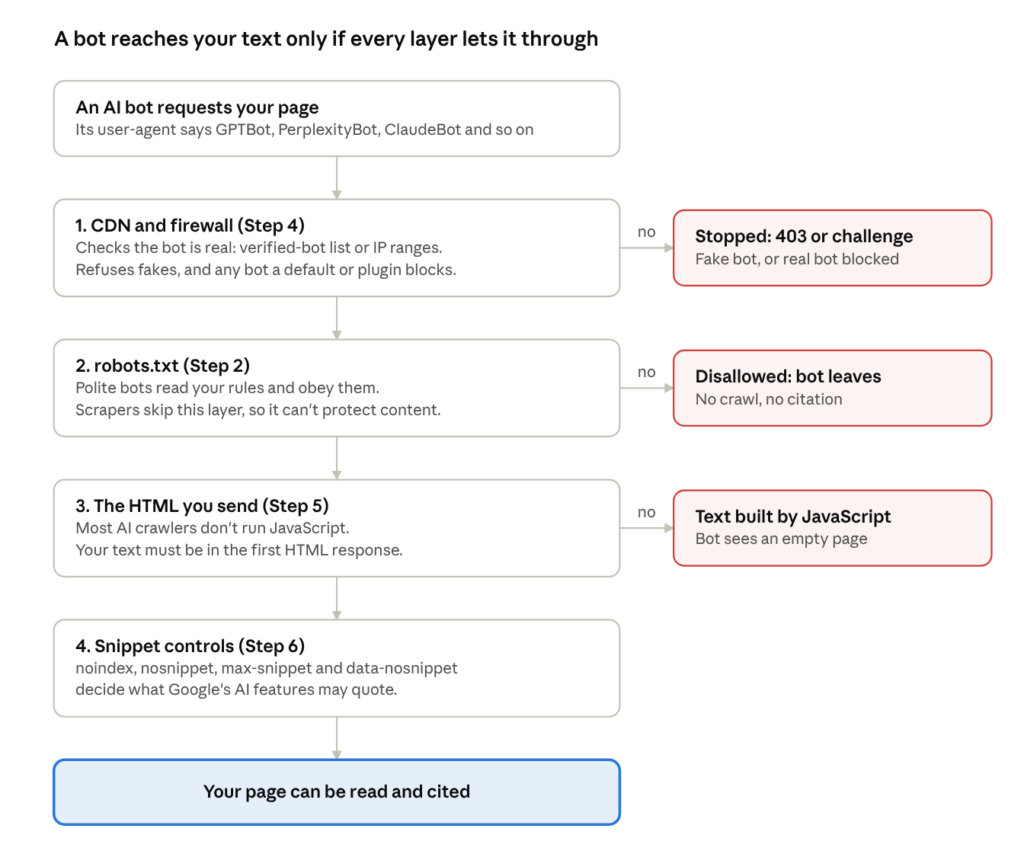
How an AI bot’s request reaches your page · 4 layers
Each layer can stop a bot, and they run in this order. That’s why a perfect robots.txt can still leave you invisible: a CDN that refuses the bot, or a page whose text needs JavaScript, undoes it. The steps below follow the same layers.
The AI bots that matter, and what each one does
Each AI company now runs separate bots for separate jobs, and you can treat each one differently. Sort them into three groups before you decide anything:
-
- Training crawlers collect pages to train future models. Blocking them doesn’t remove you from today’s answers.
-
- Search crawlers build the index an assistant searches when it answers. Block these and you won’t be cited.
-
- User-triggered fetchers open a page because a person pasted the link or asked the assistant to look it up. Several of them say robots.txt may not apply, because a human started the request.
| Company | User-agent token | Job | Obeys robots.txt | Verify with |
|---|---|---|---|---|
| OpenAI | OAI-SearchBot | ChatGPT search results | Yes | openai.com/searchbot.json |
| OpenAI | GPTBot | Training | Yes | openai.com/gptbot.json |
| OpenAI | ChatGPT-User | User-triggered fetch | “May not apply” | openai.com/chatgpt-user.json |
| OpenAI | ChatGPT agent (no token) | Browses for a user | Not stated | Web Bot Auth signature |
| Anthropic | Claude-SearchBot | Search results | Yes | claude.com/crawling/bots.json |
| Anthropic | ClaudeBot | Training | Yes, plus Crawl-delay | Same list |
| Anthropic | Claude-User | User-triggered fetch | Yes | Same list |
| Perplexity | PerplexityBot | Search index | Yes | perplexity.com/perplexitybot.json |
| Perplexity | Perplexity-User | User-triggered fetch | “Generally ignores” | perplexity.com/perplexity-user.json |
| Googlebot | Search, AI Overviews, AI Mode | Yes | Reverse DNS (googlebot.com) or Google’s IP files | |
| Google-Extended | Token only: Gemini training and grounding | Yes | Nothing to verify: it never crawls | |
| Microsoft | Bingbot | Bing and Copilot | Yes | Reverse DNS (search.msn.com) or bingbot.json |
| Apple | Applebot | Siri and Spotlight search | Yes | Reverse DNS (applebot.apple.com) or applebot.json |
| Apple | Applebot-Extended | Token only: Apple AI training | Yes | Nothing to verify: it never crawls |
| Amazon | Amzn-SearchBot | Alexa and Amazon search | Yes | Amazon’s published IP lists |
| Amazon | Amazonbot | Products, may train models | Yes | Amazon’s published IP lists |
| Amazon | Amzn-User | User-triggered fetch | “May not follow all” | Amazon’s published IP lists |
| Meta | Meta-WebIndexer | Meta AI search citations | Yes | Meta’s network (AS32934) |
| Meta | Meta-ExternalAgent | Training and indexing | Yes | Meta’s network (AS32934) |
| Meta | Meta-ExternalFetcher | User-triggered fetch | “May bypass” | Meta’s network (AS32934) |
| Common Crawl | CCBot | Open web archive many AI labs train on | Yes | Reverse DNS (crawl.commoncrawl.org) or ccbot.json |
Three details catch people out:
- Google-Extended and Applebot-Extended are not crawlers. They’re robots.txt tokens that control how Google and Apple may use pages Googlebot and Applebot already fetched. Any request in your logs claiming to be Google-Extended is fake.
- AI Overviews and AI Mode are part of Google Search. They run on Googlebot. Blocking Google-Extended does not take you out of them.
- OpenAI’s settings are independent. OpenAI says you can allow OAI-SearchBot and block GPTBot, and that robots.txt changes take about 24 hours to apply.
This table covers the bots most sites need to decide on. Others exist, such as Bytespider and DuckAssistBot. Before you write a rule for one, check its owner’s documentation for the exact token. Third-party bot lists go out of date.
Step 1: Decide what each kind of bot gets
This is a business decision, so make it before anyone opens a config file. The question: do you want AI tools to recommend you and send people to you, or is your content the product you sell?
| Your situation | Training crawlers | Search crawlers | User-triggered fetchers |
|---|---|---|---|
| You sell a product or service and want to be recommended (most B2B, SaaS, D2C, local and service businesses) | Allow | Allow | Allow |
| You publish content and want citations, but not to feed training | Block | Allow | Allow |
| Your content is paid, licensed or members-only | Block | Allow on public pages only | Block paid pages at the firewall |
If you want to be recommended, blocking training crawlers usually costs more than it saves. Future models learn what your company does partly from your own pages. Block them, and your competitors’ pages and third-party reviews tell that story instead.
User-triggered fetchers need their own decision. Several say robots.txt may not apply to them. If you must keep them out of a section, robots.txt won’t do it: you need a login, or a firewall rule that verifies the bot (Step 4).
Step 2: Write your robots.txt
Robots.txt is a request, not a lock. Well-behaved crawlers follow it and scrapers ignore it. That’s why matching bots by name is fine here: a fake GPTBot gains nothing from your robots.txt that it couldn’t get by ignoring the file.
The rules that matter
- The file lives at the root: https://www.example.com/robots.txt. Each subdomain (blog., shop.) needs its own file.
- A group is one or more User-agent: lines followed by Allow: and Disallow: rules. You can stack several user-agent lines over one set of rules.
- A bot follows only the most specific group that names it. Add a User-agent: GPTBot group and GPTBot ignores everything under User-agent: *. Copy any rules it still needs, such as /wp-admin/, into its group.
- User-agent names are not case-sensitive. Paths are: /Blog/ and /blog/ are different.
- When an Allow and a Disallow both match, the longer path wins. On a tie, Google picks Allow.
- * matches any characters. $ marks the end of a URL. Disallow: /*.pdf$ blocks every PDF.
- Google ignores Crawl-delay. Anthropic says ClaudeBot follows it.
- Google reads only the first 500 KiB of the file.
- If robots.txt returns a server error (5xx), Google can stop crawling the whole site. A 404 means “no rules”. Make sure it returns a plain 200.
Template A: allow every AI bot (most businesses)
You don’t need to name AI bots at all. They fall under *. Naming them only creates chances to make mistake 3 above.
User-agent: *
Disallow: /wp-admin/
Allow: /wp-admin/admin-ajax.php
Disallow: /cart/
Disallow: /checkout/

Sitemap: https://www.example.com/sitemap.xml
Template B: get cited, but don’t feed training
User-agent: *
Disallow: /wp-admin/
Allow: /wp-admin/admin-ajax.php
Disallow: /cart/
Disallow: /checkout/

User-agent: GPTBot
User-agent: ClaudeBot
User-agent: CCBot
User-agent: Meta-ExternalAgent
User-agent: Google-Extended
User-agent: Applebot-Extended
Disallow: /

Sitemap: https://www.example.com/sitemap.xml
The search bots (OAI-SearchBot, Claude-SearchBot, PerplexityBot, Googlebot, Bingbot, Applebot) still fall under *, so you stay in their results. One trade-off: Google says Google-Extended also covers grounding in Gemini, so blocking it can reduce how often the Gemini app cites you.
Template C: keep a members area away from every bot
User-agent: *
Disallow: /members/
Disallow: /account/

Sitemap: https://www.example.com/sitemap.xml
This keeps polite crawlers out. It won’t stop user-triggered fetchers that ignore robots.txt, or scrapers. Paid content belongs behind a login.
Common mistakes
-
- A blanket Disallow: / left over from a staging site.
-
- An “AI blocker” list copied from 2023 that includes search bots such as OAI-SearchBot or PerplexityBot.
-
- A named AI group with Allow: / that opens /wp-admin/, internal search or filter URLs (rule 3).
-
- Blocked CSS and JS folders, which stop Googlebot and Applebot rendering the page.
-
- Rules written for www while the site serves from the bare domain, or the other way round.
Step 3: Make the change on your platform
Most site builders don’t let you upload a robots.txt file, so here’s where each one hides the setting. After any change, open yoursite.com/robots.txt and confirm the live file says what you meant.
| Platform | Where to edit | Watch out for |
|---|---|---|
| WordPress + Yoast | Yoast SEO → Tools → File editor → Create or edit robots.txt | Needs write access to the site root. If it fails, upload the file by FTP or your host’s file manager |
| WordPress + Rank Math | Rank Math → switch to Advanced Mode → General Settings → Edit robots.txt | Delete any physical robots.txt in the site root first, or Rank Math’s version is ignored |
| WordPress, no SEO plugin | Upload a robots.txt file to the site root | A physical file replaces the one WordPress generates |
| Shopify | Online Store → Themes → Edit code → create templates/robots.txt.liquid | Read the default file first. Most stores only need this template to block training bots |
| Wix | Dashboard → SEO & GEO → Tools and settings → Robots.txt Editor → View File | Wix’s own help article on AI crawlers lists ChatGPT-User. Copying it blocks user fetches from ChatGPT |
| Squarespace | Settings → Crawlers → Artificial Intelligence Crawlers | A toggle, not an editor. Leave it off if you want AI visibility |
| Webflow | Site settings → SEO → Indexing → robots.txt field, then publish | Changes go live only when you publish the site |
| Cloudflare (any platform) | AI Crawl Control, plus Security settings for bot defaults | Managed robots.txt can add lines to your file. Check the live file |
Shopify: block training bots and keep Shopify’s defaults
Paste this into robots.txt.liquid. The loop reproduces Shopify’s default rules; the lines after it add your own group.
{% for group in robots.default_groups %}
  {{- group.user_agent }}
  {%- for rule in group.rules -%}
    {{ rule }}
  {%- endfor -%}
  {%- if group.sitemap != blank -%}
    {{ group.sitemap }}
  {%- endif -%}
{% endfor %}
User-agent: GPTBot
User-agent: ClaudeBot
User-agent: CCBot
User-agent: Google-Extended
Disallow: /Don’t replace the loop with a hand-written file. Shopify updates its default rules over time, and the loop keeps them current.
Step 4: Check your CDN, firewall and security plugins
This layer sits in front of robots.txt. If it refuses a bot, the bot never reads your rules. It’s also where the most expensive mistakes happen, in both directions.
Your CDN may be deciding for you
Cloudflare changed its defaults on 15 September 2026. For new domains, bots it classes as Training or Agent are blocked on pages that show ads, while Search bots stay allowed. Existing customers can opt out under Security settings.
The bigger trap is the “block training” switch. Googlebot, Applebot and Bingbot do more than one job, and Cloudflare applies the strictest rule that matches. Its announcement says multi-purpose crawlers “will be blocked by customers who have selected to block Training”. Tick that box to stop GPTBot, and you can block Googlebot too. Run a live URL Inspection in Search Console after every change here.
Outside Cloudflare, check:
-
- security plugins such as Wordfence, and “bad bot” lists in hosting firewalls
-
- country blocking, or rate limits that catch data-centre IPs, where these bots run
-
- any “block AI” switch in your site builder (Step 3)
Never allow a bot by its name alone
A user-agent is a line of text the visitor sends. Any script can claim to be GPTBot/1.4, and scrapers do, because they know many sites let AI bots through. Common Crawl’s own crawler page warns that fake CCBots exist.
So any rule that gives a bot something must check the bot is real. That covers:
-
- firewall or WAF rules that skip the challenge for AI bots
-
- rate-limit exemptions
-
- bot-protection or CAPTCHA bypasses
-
- serving full articles past a paywall or login to crawlers
There are three ways to verify, from easiest to hardest:
- Your CDN’s verified-bot signal. Cloudflare, Akamai, Vercel and HUMAN check bot identity for you. On Cloudflare, the cf.client.bot field is true only for bots it has verified.
- The provider’s published IP list. OpenAI, Anthropic, Perplexity, Google, Microsoft, Apple, Amazon and Common Crawl publish theirs (see the bot table). A request claiming to be GPTBot from an IP outside gptbot.json is fake.
- Reverse DNS, then forward DNS. Google, Microsoft, Apple and Common Crawl support it. The full method and an nginx setup are in the developer section at the end.
A Cloudflare rule that blocks fake AI bots
Create a WAF custom rule with this expression. The end state is the action Block:
(http.user_agent contains "GPTBot"
  or http.user_agent contains "OAI-SearchBot"
  or http.user_agent contains "ChatGPT-User"
  or http.user_agent contains "ClaudeBot"
  or http.user_agent contains "Claude-SearchBot"
  or http.user_agent contains "PerplexityBot")
and not cf.client.bot
Start with the action set to Managed Challenge for a week and review Security Analytics before you switch to Block. (The Log action is Enterprise-only.) If a real bot isn’t on Cloudflare’s verified list, this rule would block it. Field names vary by plan, and Cloudflare reorganised its bot categories on 1 July 2026, so confirm the field in your rule builder.
One more check: on the free plan, Cloudflare’s AI Crawl Control identifies AI crawlers by user-agent string. Its reports will count fakes as real bots until you add a rule like this one.
Want us to check your robots.txt, CDN rules and bot verification in one pass? Book a free call →
Step 5: Make sure bots can read the page
Allowing a bot does nothing if it can’t read what it fetches. Vercel measured AI crawler traffic across its network in December 2024 and found that none of the major AI crawlers it tracked ran JavaScript: GPTBot, OAI-SearchBot, ChatGPT-User, ClaudeBot, PerplexityBot, Meta-ExternalAgent and Bytespider. OpenAI’s and Anthropic’s crawlers downloaded JavaScript files but didn’t execute them. Gemini, on Google’s infrastructure, and Applebot did render pages.
Crawlers change, so plan for the worst case: if the text isn’t in the HTML your server sends, assume AI bots don’t see it.
Test a page:
curl -s https://www.example.com/your-page/ | grep -i "a sentence from the page"No output means the text is built by JavaScript. If your CDN challenges curl, use View Source in a browser instead. Don’t test with a faked GPTBot user-agent: if you set up the rule in Step 4, it will block you.
Fixes, in order of preference:
- Server-side rendering or static generation. Next.js, Nuxt, Astro and most current frameworks support it.
- Prerendering for bots, if the front end can’t change soon.
- Move key facts out of click-to-load tabs, accordions filled by API calls, and images. Prices, specs, service areas and FAQs should be plain text in the first HTML response.
Speed matters too. A page that takes several seconds to start responding risks a timeout, especially for user-triggered fetchers that answer a person in real time.
Step 6: Control what gets quoted
Google’s rule is short: to appear as a supporting link in AI Overviews or AI Mode, a page must be indexed and eligible to show a snippet in Search. There are no extra requirements. The snippet controls you already know decide what AI features can use:
| Control | Syntax | Effect |
|---|---|---|
| noindex | <meta name=”robots” content=”noindex”> | Page out of Search and its AI features |
| nosnippet | <meta name=”robots” content=”nosnippet”> | No text snippet, and no AI use of the page’s text |
| max-snippet | <meta name=”robots” content=”max-snippet:160″> | Caps how many characters can be quoted |
| data-nosnippet | <div data-nosnippet>…</div> | Keeps one block, such as pricing notes or legal text, out of snippets |
| X-Robots-Tag | HTTP header: X-Robots-Tag: nosnippet | Same controls for PDFs and other files that can’t hold a meta tag |
| Google-Extended | robots.txt token (Step 2) | Gemini training and grounding only. No effect on Search or AI Overviews |
Use them surgically. nosnippet on a whole page also removes the snippet from your normal search listing, which usually costs clicks. data-nosnippet on one block is the safer tool.
Outside Google, there’s no snippet-level control you can count on. Bing has no equivalent of Google-Extended, and Bingbot feeds both Bing and Copilot. For ChatGPT, Claude and Perplexity, your control is which of their bots you allow.
You may also see Content-Signal lines in robots.txt (for example Content-Signal: search=yes, ai-train=no). Cloudflare introduced them in September 2025 and adds them to sites that use its managed robots.txt. They state a preference. No major AI company has publicly committed to honouring them, so don’t rely on them alone.
What you can skip
Much “AI readiness” advice adds files and markup that no major system has said it uses.
llms.txt. Google’s guide to generative AI in Search, published in May 2026, says you don’t need new machine-readable files, AI text files or Markdown versions, and that Google Search ignores them. Google’s Gary Illyes said the same in July 2025. The one counter-signal is that Lighthouse 13.3 added an experimental llms.txt check, aimed at browser agents rather than search. Add one if you run a large documentation site. Don’t expect it to change citations, and don’t pay anyone to optimise it.
AI-specific schema. The same Google guide says structured data isn’t required for generative AI search, and there’s no special schema.org markup to add. Keep the schema you use for rich results, and keep it accurate.
Rewriting pages into chunks. Google says there’s no need to break content into small pieces or write a special way for AI. Clear headings and direct answers help human readers, which is reason enough.
Step 7: Test, then monitor monthly
Run these checks after every change to robots.txt, CDN or firewall rules, and once a month after that.
- robots.txt. Confirm the live file returns a 200 and says what you meant. In Google Search Console, the robots.txt report under Settings shows the version Google fetched and any parse errors.
- Googlebot still gets through. Run a live URL Inspection test on your top pages in Search Console. This catches the Cloudflare “block training” trap.
- Server logs. Pull 30 days of requests for each AI user-agent. Check each IP against the provider’s list and split verified requests from fakes. For the verified ones, look at status codes: 403s or 429s mean your own rules are blocking bots you meant to allow.
- Fakes are blocked. Requests that claim an AI user-agent from an unlisted IP should get a 403 or a challenge, not a 200.
- Citations and visits. Bing Webmaster Tools’ AI Performance report (public preview since February 2026) shows how often Copilot cites your pages, and which ones. It doesn’t show clicks. In GA4, track referral sessions from chatgpt.com, perplexity.ai, claude.ai, gemini.google.com and copilot.microsoft.com.
Don’t report raw AI crawler hits as progress. Without the IP check in point 3, those counts include scrapers using AI bot names, and crawling says nothing about whether you’re being cited.
Risks and trade-offs
| Risk | What happens | How to avoid it |
|---|---|---|
| Firewall allowlist by user-agent | Any scraper that sends “GPTBot” skips your bot protection and rate limits | Verify by CDN signal, IP list or reverse DNS (Step 4) |
| “Block training” on Cloudflare | Googlebot, Applebot and Bingbot can be blocked with it | Test Googlebot after the change (Step 7) |
| Blocking search crawlers by mistake | You disappear from ChatGPT, Claude or Perplexity answers | Block only training tokens (Template B) |
| Named AI group in robots.txt | That bot ignores your * rules and crawls admin or filter URLs | Copy needed Disallows into the named group |
| robots.txt returns 5xx | Google can pause crawling of the whole site | Monitor the file’s status code |
| Text built by JavaScript | AI bots fetch an empty shell | SSR, static generation or prerendering (Step 5) |
| Stale IP lists | Real bots get blocked as fakes after a provider adds ranges | Refresh lists daily; keep the old list if a fetch fails |
| robots.txt used to protect paid content | User-triggered fetchers and scrapers ignore it | Put paid content behind a login |
| Page-wide nosnippet | Lost snippets in normal Search as well as AI features | Use data-nosnippet on the specific block |
FAQ
Will blocking GPTBot hurt my Google rankings?
No. GPTBot is OpenAI’s training crawler, and Google ranks pages using Googlebot. Google also says Google-Extended doesn’t affect inclusion or ranking in Search.
Does blocking GPTBot remove me from ChatGPT?
No. ChatGPT search uses OAI-SearchBot, and OpenAI says each setting is independent. Blocking OAI-SearchBot is what keeps you out of ChatGPT search answers, though OpenAI says you can still appear as a navigational link.
If I allow every AI bot, will AI tools cite me?
Not by itself. Access is the entry ticket. Google says the way to appear in AI Overviews is normal SEO: pages that are indexed, useful and eligible for a snippet. The same logic applies elsewhere. The assistant cites the page that answers the question best.
How long do robots.txt changes take to apply?
OpenAI says about 24 hours. Amazon says its crawlers cache robots.txt for up to 30 days. Plan for a delay of days, not minutes, and don’t judge results in the first week.
Can I submit my site to ChatGPT or Perplexity?
Neither documents a submission form. OpenAI’s advice is to allow OAI-SearchBot and requests from its published IP ranges. For Copilot, submit your sitemap in Bing Webmaster Tools, because Bingbot feeds both Bing and Copilot.
Should I block ChatGPT-User and Perplexity-User?
Usually not. They open your page when someone asks an assistant about it, often about your own product or pricing. Block them, and the assistant answers that person without reading your page.
Will AI bots slow my server down?
They add load, like any crawler. If they cause problems, rate-limit verified bots instead of blocking them, serve cached pages to bots, and use Crawl-delay for ClaudeBot, which follows it.
Why does ChatGPT traffic show as Direct in GA4?
ChatGPT adds utm_source=chatgpt.com to its links. When a visit arrives with neither the referrer nor that tag, which happens in some apps, GA4 has no source and files it as Direct. Your AI referral numbers are a floor, not a total.
Do I need an llms.txt file?
Not for Google, which says Search ignores it. See “What you can skip”.
Want to know which AI bots can read your site right now, and which ones only claim to? Book a free AI crawler audit →